Net Worth Tracker Spreadsheet: 24 Months with Charts
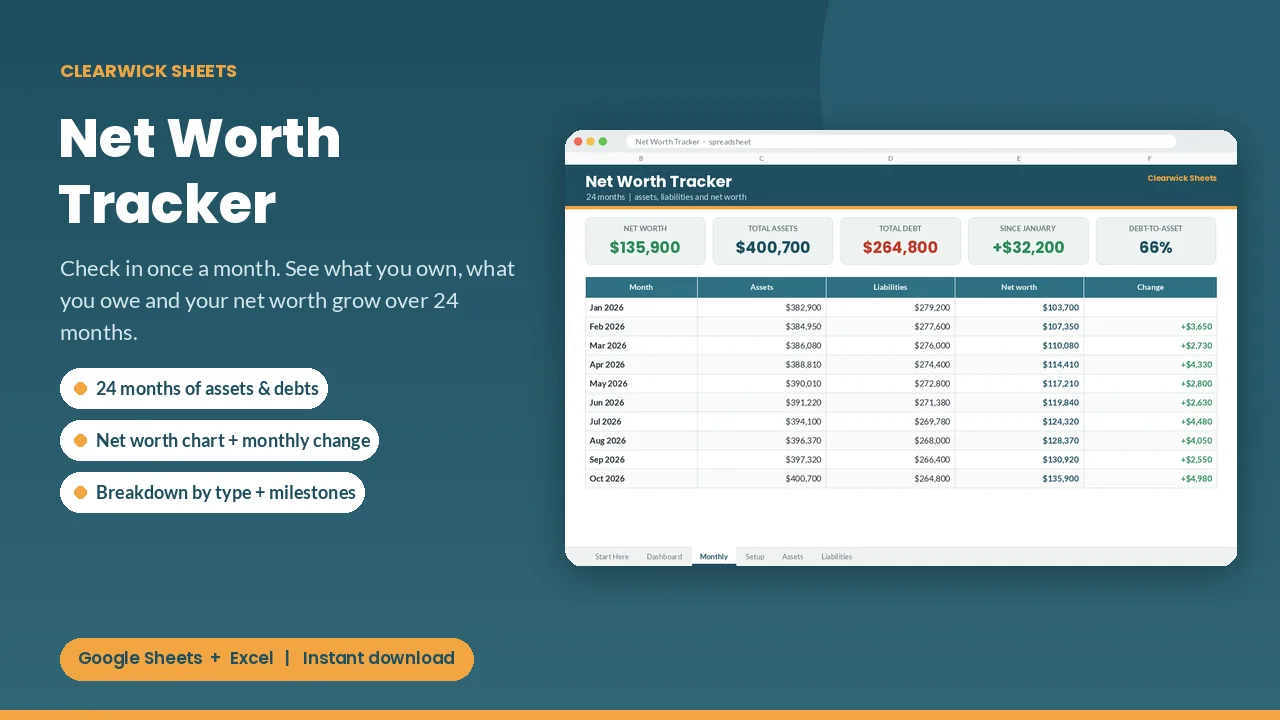
Update your balances once a month and watch your net worth grow: assets, debts, monthly change and charts for 24 months.
$6Buy on Gumroad – instant download
How to calculate and track your net worth
Net worth = everything you own (assets) − everything you owe (liabilities).
- Assets: cash and savings, retirement and investment accounts, the market value of your home and car.
- Liabilities: mortgage, car loans, student loans, credit card balances, other debts.
Update it once a month on the same day. A single number means little; the trend matters. Paying down debt and saving both move it up, even when markets are flat. Negative net worth is normal early on (for example with student loans); watching it rise toward zero is motivating.
The tracker gives you 24 months of balances, the monthly change and charts, so the trend is visible at a glance.
What you get and how to use it
One number tells you if your money is really moving in the right direction. Check in once a month, type your balances, and this tracker shows your net worth, how much it changed and where your money sits.
What's inside
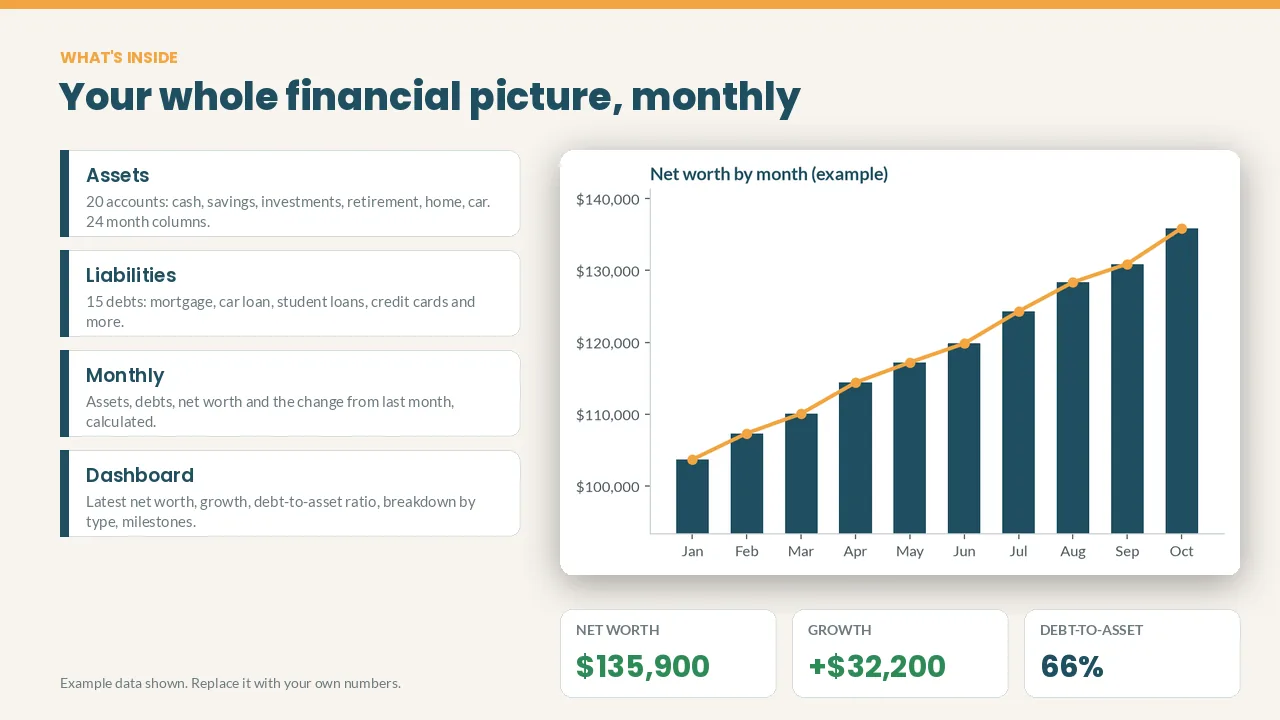
- Dashboard: latest check-in month, net worth, total assets, total debt, change since your first month and debt-to-asset ratio
- Breakdown by type: assets (cash, savings, investments, retirement, home, vehicles...) and debts (mortgage, car loan, student loans, credit cards...) for your latest month, with % of total
- Milestones: net worth above $0, $10k, $25k, $50k, $100k and more, with your own amounts if you like
- Assets tab: 20 accounts × 24 months
- Liabilities tab: 15 debts × 24 months
- Monthly tab: assets, liabilities, net worth, change and change % for every month
- Charts: net worth by month, and assets vs liabilities
How it works
- Pick your first month on the Setup tab.
- List your accounts and debts.
- Once a month, type each balance. Everything else updates.
Blank months are skipped, not counted as zero. Cream cells are for your inputs; everything else calculates itself. The example data is fictional; clear it in a minute.
Works with: Google Sheets (free) and Microsoft Excel 2016 or newer / Excel 365. Not tested on Apple Numbers.
Format: 1 × .xlsx file, delivered instantly. To use it in Google Sheets: upload it to Google Drive, open it, then File > Save as Google Sheets.
Currency: shown in $. You can switch it to £, € or any currency with Format > Number.
FAQ
- Does it connect to my bank? No. You type the balances, so nothing is shared with anyone.
- My net worth is negative. Is this for me? Yes. Plenty of people start below zero (student loans!). The direction of the chart is what matters.
- Is this financial advice? No. It's an organizing tool that does the math for you.
- Refunds: Because it's a digital download, contact me first if anything doesn't work and I'll fix it or refund you.
For personal use. Please don't resell or share the file.
Get the Net Worth Tracker – $6
How this was made: designed by Clearwick Sheets with AI-assisted tools; every formula was tested in Google Sheets before release. Example data in the screenshots is fictional. This is an organizing tool, not financial advice.